StoreSathi
EN
Download
StoreSathi
EN
Download

Credit note format

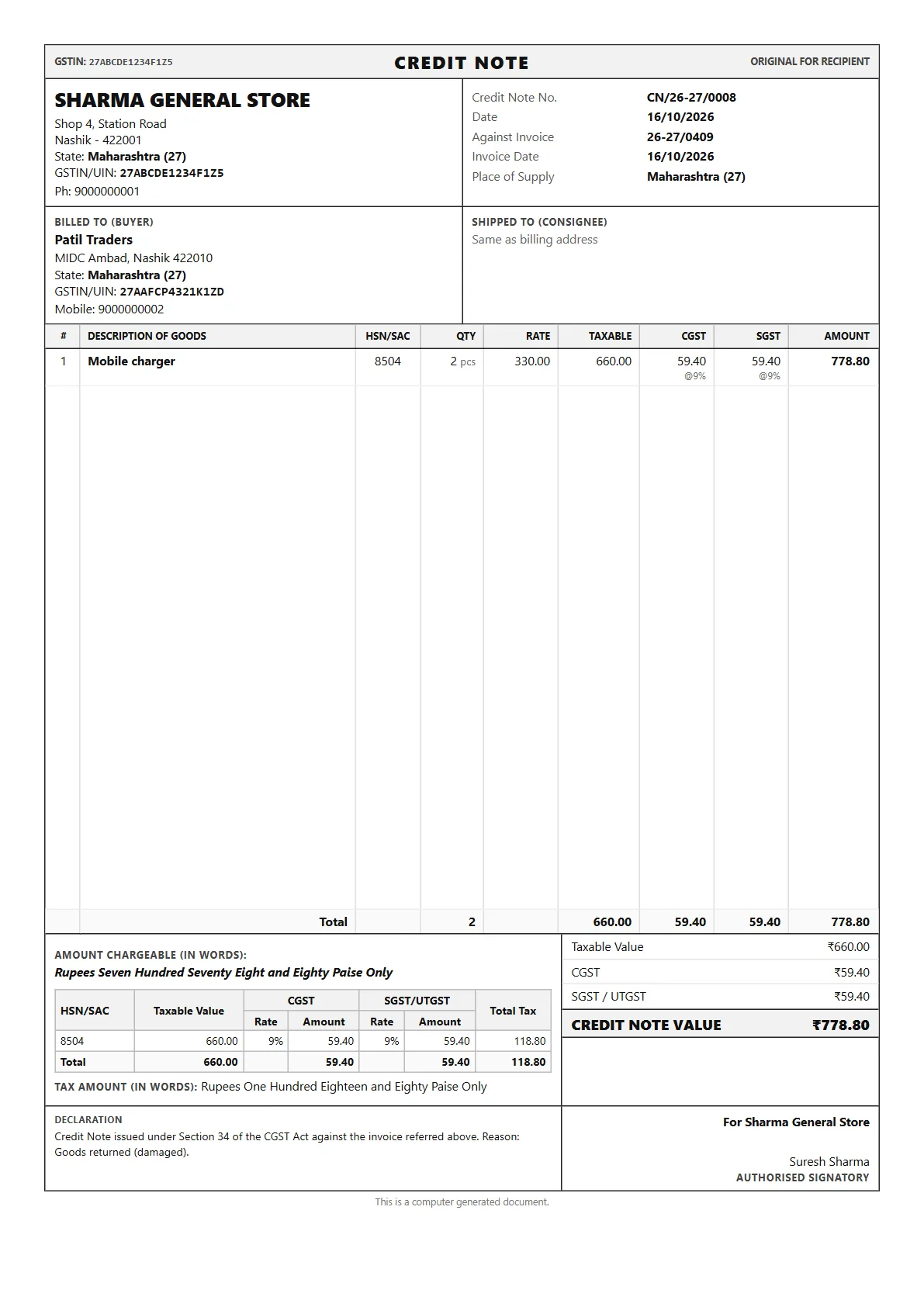
A real A4 credit note from StoreSathi, for two damaged chargers returned against a bill.

This sample

  • DocumentCredit note
  • AgainstInvoice 26-27/0409
  • ReasonGoods returned

What StoreSathi prints on it

Title strip
CREDIT NOTE across the top, your GSTIN and ORIGINAL FOR RECIPIENT.
Note details
Credit note number, date, the invoice it is against with that invoice’s date, and place of supply.
Buyer
The same buyer as on the original invoice, with GSTIN and state.
Item lines
Only the items being returned, with HSN code, quantity, rate, taxable value and tax.
Totals
Taxable value, each tax and the credit note value, also in words, with an HSN summary.
Declaration
A line naming the invoice it is against and the reason you entered.

Sample shop, people and figures. GST rates and HSN codes are examples; set the ones that apply to your own items.

Make one in StoreSathi

  1. Press Ctrl+F8 for a sales return and find the original bill.
  2. Choose the items and quantities coming back. They go back into stock.
  3. Choose how you settle it: cash, UPI, store credit or an exchange.
  4. For a GST-registered shop StoreSathi gives it the next credit note number and prints it against the original bill.

Related features: Billing at the counter, GST.

Questions

Can I issue a credit note without goods coming back? Yes. StoreSathi can make a credit or debit note against a bill for a change in price, without a return of goods.

Does it show in my GST returns? Yes. Credit notes are included in the GST reports StoreSathi prepares. Check the figures with your CA before you file.

Why is there no UPI QR on the credit note? A credit note is money going back to the customer, so StoreSathi leaves out the bank details and the pay QR.

Can I cancel a credit note made by mistake? Yes. You can cancel it with a reason, and StoreSathi keeps the cancellation and the reason in its activity log.

Other formats

Print yours in minutes

30 days free with every feature, on your PC and phone. No card needed.