StoreSathi
EN
Download
StoreSathi
EN
Download

Quotation format with GST

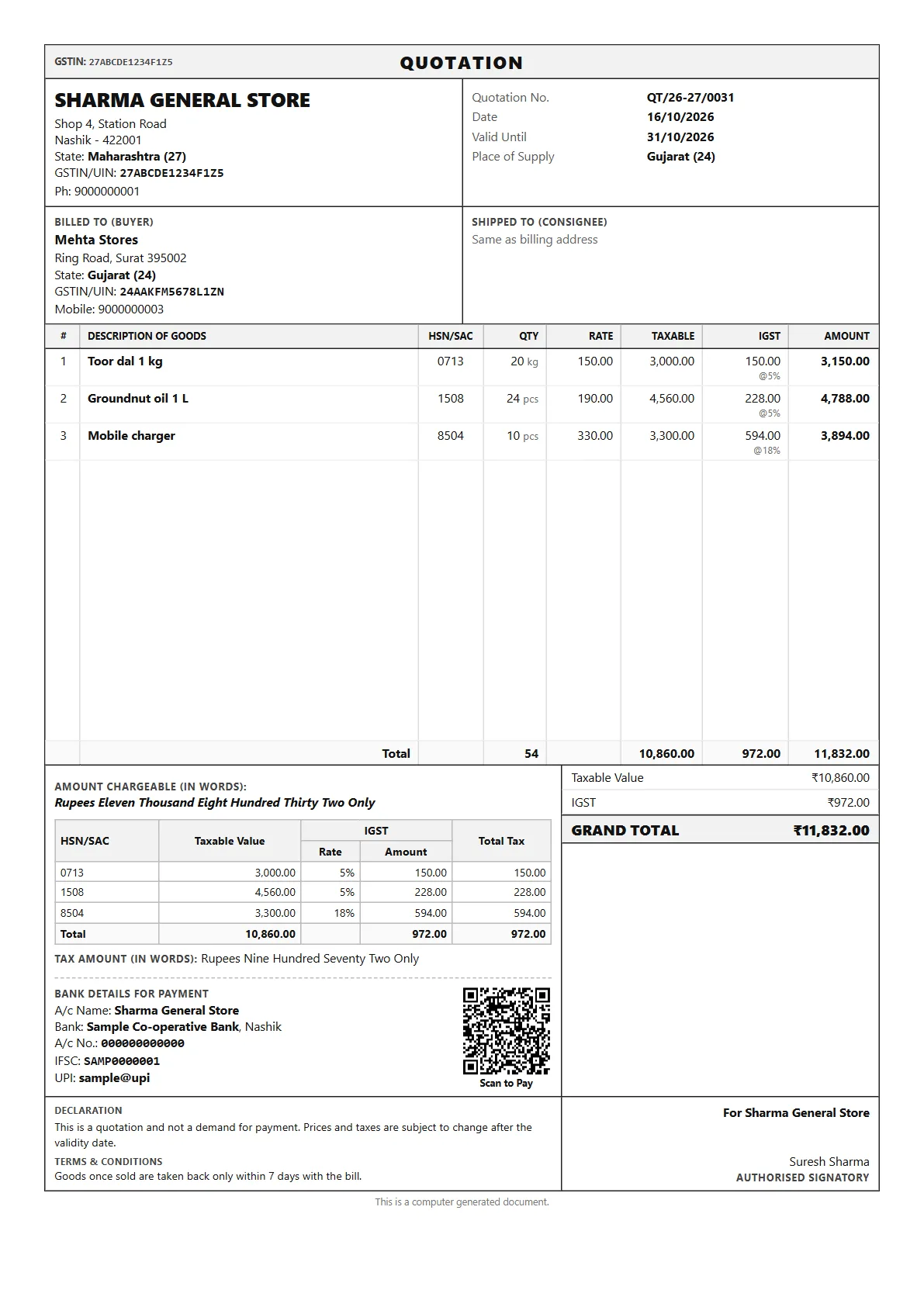
A real A4 quotation from StoreSathi, for a buyer in another state, so the tax is IGST.

This sample

  • DocumentQuotation
  • Valid until31/10/2026
  • TaxIGST

What StoreSathi prints on it

Title strip
QUOTATION across the top with your GSTIN.
Quotation details
Quotation number, date, the date it is valid until, and place of supply.
Buyer
Name, address, state, GSTIN and mobile. Here the buyer is in Gujarat and the shop in Maharashtra.
Item lines
HSN code, quantity, rate, taxable value, IGST with its rate, and the line amount.
Totals
Taxable value, IGST and the grand total, also in words, with an HSN summary.
Getting paid
Bank details and a UPI QR, so an advance can be paid straight away.
Declaration
A line saying this is a quotation, not a demand for payment, and that prices can change after the validity date.

Sample shop, people and figures. GST rates and HSN codes are examples; set the ones that apply to your own items.

Make one in StoreSathi

  1. Open Quotations and press Alt+C for a new one. Pick the customer and add items.
  2. Set the valid-until date and save. Alt+P shows and prints it; Alt+W sends it on WhatsApp.
  3. When the customer agrees, turn it into a proforma invoice (Alt+R) or a delivery challan in one step.
  4. The quotation is marked as converted, with the number of the document it became.

Related features: Billing at the counter, Printing and sharing.

Questions

Does a quotation change my stock or accounts? No. A quotation is only an offer. Stock changes when goods go out on a challan or a bill, and accounts change with the bill.

Why IGST and not CGST and SGST? In this sample the buyer’s state (Gujarat) is different from the shop’s state (Maharashtra), so StoreSathi shows IGST. For a buyer in your own state it shows CGST and SGST.

Can I send it as a PDF on WhatsApp? Yes. With WhatsApp automation on, StoreSathi sends the PDF itself; otherwise it sends the quotation as a message.

What happens after the valid-until date? StoreSathi shows the quotation as expired in the list, so you know to check prices before you convert it.

Other formats

Print yours in minutes

30 days free with every feature, on your PC and phone. No card needed.