 StoreSathi
 Why your shop needs billing that works offline
Offline billing software keeps your counter running when the internet or power fails. Here is what to look for, and how StoreSathi works without internet.
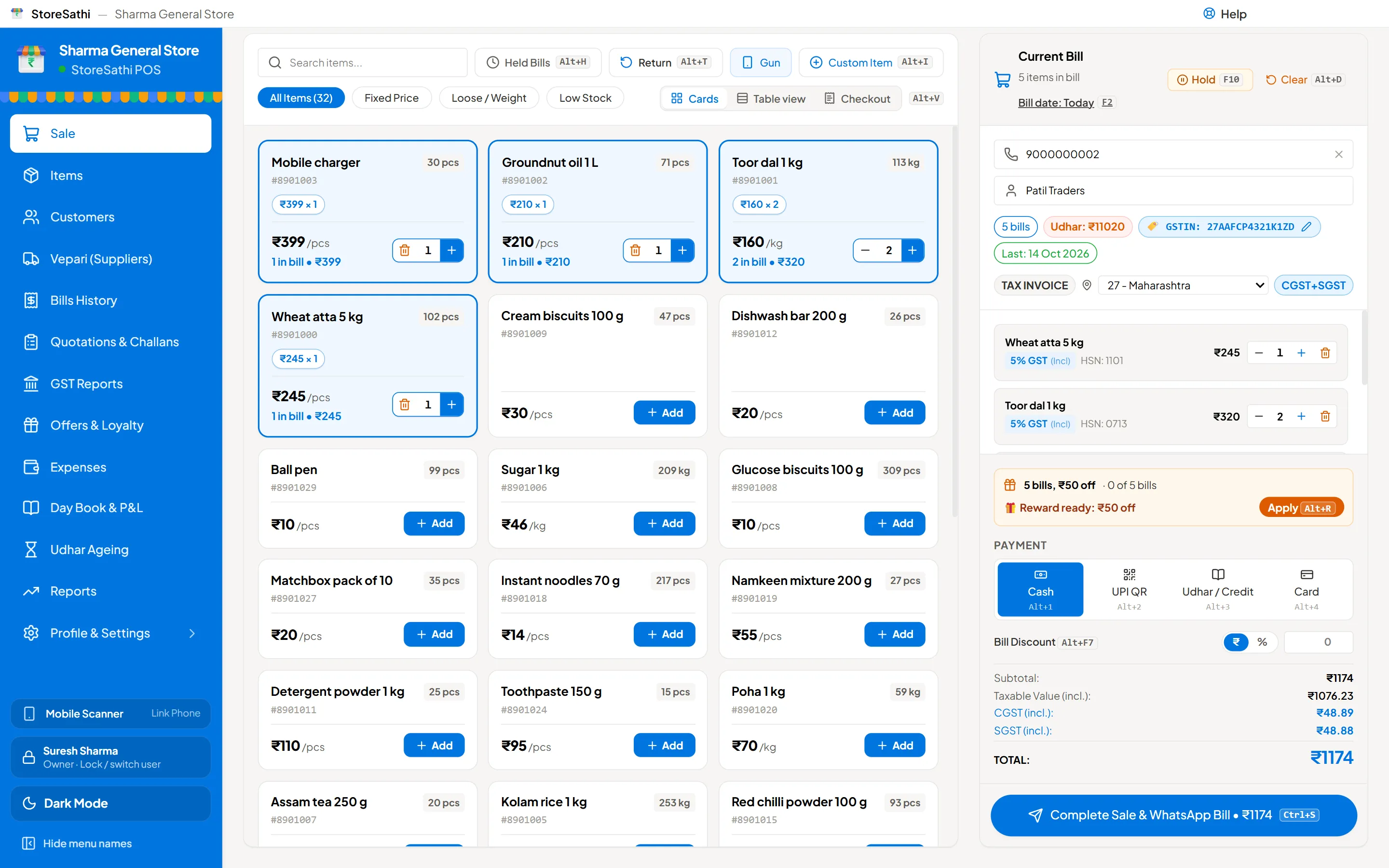
Your shop needs billing that works offline because customers do not wait for the internet to come back. If the bill cannot be made, the sale is lost or written on paper and entered later, and that is where mistakes start. Offline billing software keeps the whole counter, billing, printing, stock and udhar, running on your own PC, whatever the network is doing.
Here is why it matters, what “offline” should really mean, and how StoreSathi handles it.
What goes wrong when billing depends on the internet?
Most shops have seen at least one of these:
- The mobile data or broadband drops at the busiest hour, and the billing screen keeps loading.
- The software company’s server is slow or down, and nobody at the shop can do anything about it.
- A power cut takes the router down with it, even if the PC runs on an inverter.
- Bills written on paper during the outage are entered late, with wrong prices or missing items.
Each of these costs money: a customer who walks out, a bill made at the wrong price, or udhar that never gets written down. Online-only billing turns a small network problem into a counter problem.
What does “works offline” really mean?
Many apps say they work offline, but only let you view old data, or make a bill that waits to be “synced” before it counts. For a shop, real offline billing means:
- Bills are complete without internet. The bill gets its number, the stock goes down and the udhar goes into the khata at once.
- Printing works. The thermal printer is connected to the PC, so the slip prints without any server.
- Reports work. Day book, stock summary and profit and loss come from the data on your PC.
- Your data lives with you. Nothing important sits only on someone else’s server.
StoreSathi is built this way. Your bills, items, customers and accounts are saved on your own PC and phone. Billing, printing, khata and reports all carry on with no internet at all.
When does StoreSathi need the internet?
Only for a few things, none of them part of making a bill:
| Needs internet | Works offline |
|---|---|
| Starting the free trial the first time | Making and printing bills |
| Checking the licence, at most once a day | Stock, purchases and vepari |
| Sending bills and reminders on WhatsApp | Udhar khata and ageing |
| Backing up to your Google Drive | Day book, P&L and GST reports |
If the internet is off for a while, WhatsApp messages and Drive backups simply wait. Your counter does not.
What about a power cut?
A power cut is harder than a network drop, because the PC itself may go off. Two things help.
First, StoreSathi saves as you work and backs up by itself: when you open the shop, every four hours, and when you close. A sudden shutdown does not wipe the day.
Second, a phone linked to the PC can keep billing on its own battery. While the PC is off, the phone makes numbered slips. When the PC is back, each slip becomes a proper bill with the slip’s own date and prices, and goes through the PC’s normal rules. You can read more in using your phone as a second billing counter.
Is offline software safe for my data?
Offline does not mean unprotected. Keeping data on your own PC means nobody else holds your customer list or your sales figures. The risk to watch is the PC itself: a hard disk can fail, or a laptop can be stolen.
That is why backups matter. StoreSathi keeps daily, weekly and monthly copies on the PC, lets you add a second folder such as a pen drive, and can keep an encrypted copy on your own Google Drive. Backups can be locked with a password. The full routine is in how to keep your shop’s billing data safe.
What else should offline billing software have?
Offline is the base. On top of it, look for:
- Fast keyboard billing. At a busy counter, the keyboard is quicker than the mouse. StoreSathi uses Tally-style keys: F8 for a sale, Ctrl+S to save.
- Barcode support with a USB scanner gun, plus loose items sold by weight.
- Thermal and A4 printing. See choosing a 58 mm or 80 mm thermal printer.
- Udhar khata built in, so credit is written at the moment of the sale.
- Staff access with limits, so a cashier can bill without seeing your profit.
- GST reports from the same bills, which your CA can check.
You can see the full list on the features page.
Does offline software still get updates?
Yes. Working offline does not mean being left behind. When the PC is online, StoreSathi checks for a new version and installs it by itself. It never updates in the middle of a bill, and it makes a backup first, so an update can never cost you a day’s work. If you are offline for a few days, the update simply waits until the internet is back.
How do I know if my current software is really offline?
Try a simple test on a quiet day. Turn off the Wi-Fi or unplug the router, then:
- Make a bill with three items and print it.
- Take an udhar payment from a customer.
- Open today’s sales report.
If any of these stops, shows an error or says it will “sync later”, your billing depends on the internet. With StoreSathi, all three work, and you can check it yourself during the free 30-day trial.
In short
- Online-only billing turns a network problem into a lost sale.
- Real offline billing completes the bill, the stock and the udhar without internet.
- StoreSathi needs internet only to start, check the licence, send WhatsApp and back up to Drive.
- A linked phone keeps billing with slips during a power cut.
- Keep backups, on the PC, a pen drive and your own Google Drive.
Questions
Does StoreSathi need internet to make bills? No. Billing, printing, stock, khata and reports all work without internet. The internet is needed once to start, and then only to check the licence, send WhatsApp messages and back up to Google Drive.
Where is my shop data kept? On your own PC and phone. StoreSathi's server keeps only your shop details, licence, payments and device list, never your bills, items or customers.
What happens to phone bills when the PC is off? A phone linked to the PC keeps billing with numbered slips. When the PC is back, each slip becomes a proper bill with its own date and prices.
Is offline billing software safe if my PC breaks? Yes, if you keep backups. StoreSathi backs up by itself when you open the shop, every four hours and when you close, and can keep an encrypted copy on your own Google Drive.