 StoreSathi
 Use your phone as a second billing counter
How to use an Android phone as a second billing counter for your shop PC over the shop Wi-Fi: pairing, live stock, bills saved on the PC, and billing in a power cut.
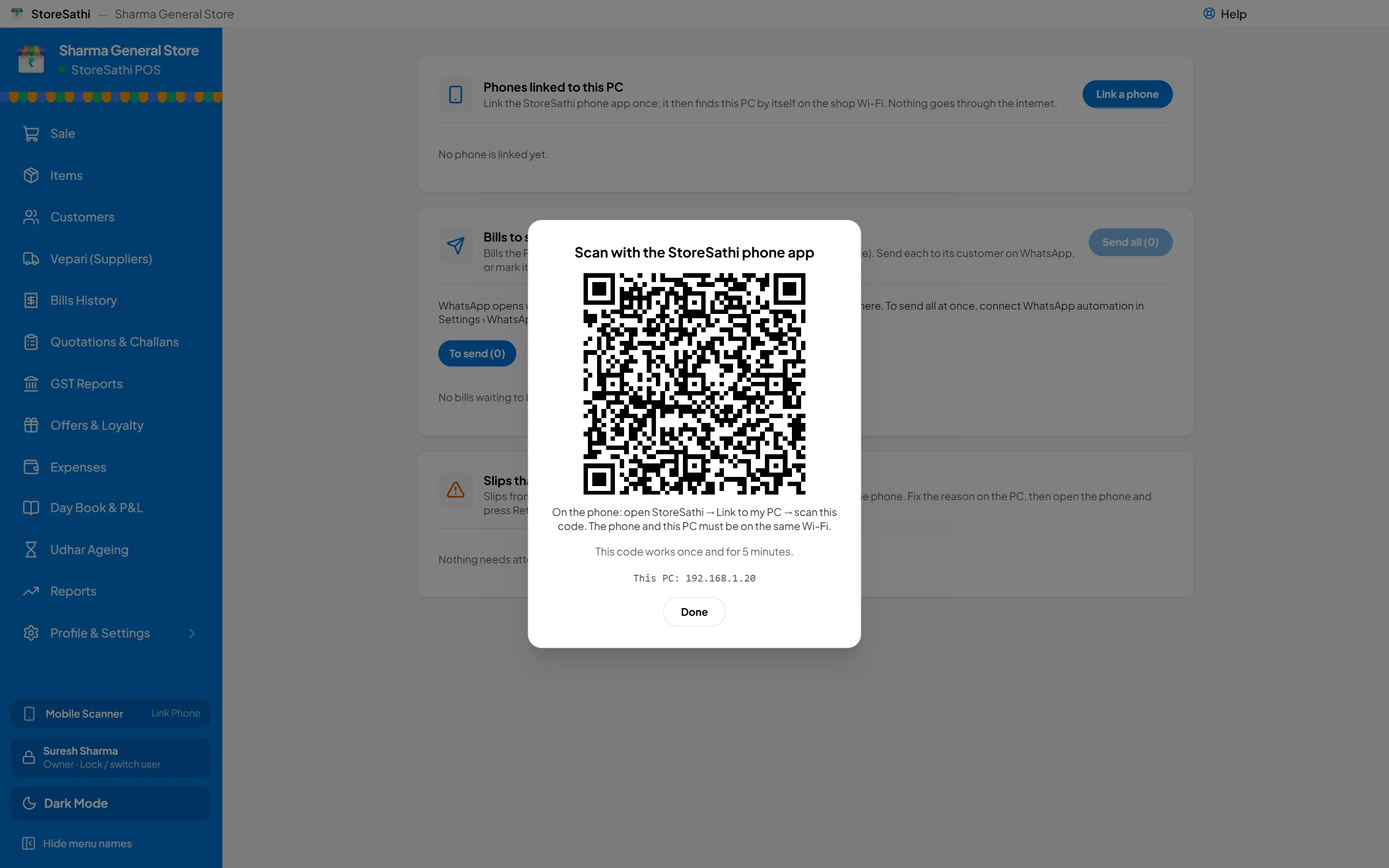
Yes, an Android phone can work as a second billing counter for your shop PC. Install StoreSathi Pro on the phone, scan the pairing code shown on the PC once, and the phone bills from the PC’s live stock and prices over your shop Wi-Fi. Every bill it makes is saved on the PC, with the PC’s own bill numbers.
This is useful in many shops. On a festival evening the counter has a queue, but a helper in the aisle with a phone can bill a customer who is standing next to the shelf. In a hardware or garment shop, the owner can walk around with the customer and build the bill as they choose. And when the power goes, the phone keeps going.
How do I link my phone to the shop PC?
You link it once:
- On the PC, open Phones and choose Link a phone. A QR code appears.
- On the phone, open StoreSathi and choose Link to my PC.
- Scan the QR code. The code works once and only for 5 minutes, so a photo of it is useless later.
That is all. After this, the phone finds the PC by itself whenever both are on the shop Wi-Fi. If the PC’s network address changes, the phone looks for it again on the local network.
The PC’s Phones screen lists every linked phone. If a phone is lost or a staff member leaves, remove that phone from the list and it stops working with the PC straight away.
Does it need internet?
No. The phone and the PC talk directly over your shop’s Wi-Fi router. Nothing goes through the internet or any cloud server, and the connection between them is encrypted.
This matters in two ways. Your bills and customers stay in your shop. And billing does not slow down or stop when the internet connection is weak, which is common in many markets. If you want to know more about why offline billing matters, read why your shop needs billing that works without internet.
What can the phone do as a second counter?
A linked phone works on the PC’s books, not its own:
- Live stock and prices. The phone reads the PC’s items, stock and prices, and sees a change about a second after it is made on the PC.
- Bills saved on the PC. When the phone completes a bill, the PC saves it with its own number, its GST rules and the user who made it.
- No double bills. If the network drops while a bill is being sent and the phone sends it again, the PC still saves it only once.
- Camera scanning on the phone. The phone’s camera scans barcodes for the bill being made on the phone.
- Bills to send. The PC keeps a list of bills from phones, so you can send each one to its customer on WhatsApp, or all at once with WhatsApp automation.
A small table helps to see who does what:
| Task | On the linked phone | On the PC |
|---|---|---|
| Make a bill | Yes, saved on the PC | Yes |
| See live stock and prices | Yes | Yes |
| Users and roles | No | Yes |
| Backups and restore | No | Yes |
| Year-end close, wiping the books | No | Yes |
The phone is not yet a barcode scanner for the PC’s own sale screen. Each device scans for the bills it makes itself.
What happens when the power goes?
In many towns, the power going for an hour is normal. A PC without a good inverter switches off, but the counter cannot just stop.
When the phone cannot reach the PC, it keeps billing and makes provisional slips, numbered in their own series. The customer gets the slip, and the phone keeps the record. When the PC is back, each slip becomes a proper GST bill with the slip’s own date and prices, B2B bills first. Slips the PC cannot accept, for example an item that was deleted in the meantime, are listed on the PC with the reason, so you can fix them.
Your bill numbers stay clean, and no sale is lost.
Who can use the phone, and with what rights?
The phone works under the role of the person logged in on it, the same roles as on the PC. A cashier on the phone can make bills, but cannot cancel them, and cost and profit stay hidden where the role hides them. Some work is kept for the PC only, as the table shows: users, backups, year-end close and wiping the books.
Setting up those roles is covered in letting staff bill without seeing your profit.
Can I use a phone without a PC at all?
Yes. StoreSathi Pro on the phone also has a mode called This phone is my shop. All the books then live on the phone, which suits a small shop, a stall or a second branch without a PC. If the shop grows, you can move the books from the phone to a PC later, with a safety backup made first. See StoreSathi on your phone for both modes.
For a very small shop that only needs quick bills and no GST, there is also the free StoreSathi app for Android, with no ads.
A few practical tips
- Keep the PC on the same Wi-Fi as the phones. A PC on a cable to the same router is fine.
- Give each helper their own login. Then every bill shows who made it, in the activity log too.
- Charge the phones. A phone at 10% at 7 pm is an easy way for a second counter to stop in the rush.
- Check the Bills to send list once in the evening, so no customer is left without their bill on WhatsApp.
In short
- Link a phone once by scanning a QR code on the PC; it then finds the PC by itself on the shop Wi-Fi.
- No internet is needed, and the link is encrypted.
- Phone bills are saved on the PC with the PC’s numbers, and a bill sent twice is saved once.
- In a power cut the phone makes slips that become GST bills when the PC is back.
- Users, backups and year-end close stay on the PC.
One licence covers the shop’s PC and phone together; see how the phone link works or start the free trial.
Questions
Does the phone need internet to bill through my PC? No. The phone and the PC talk over your shop's own Wi-Fi, and nothing goes through the internet. Both only need to be on the same Wi-Fi network.
Will bills from the phone have separate numbers? No. Every bill made on a linked phone is saved by the PC with the PC's own bill numbers, so your series stays in one line.
What happens if the power goes and the PC switches off? The phone keeps billing and makes numbered slips. When the PC is back, each slip becomes a proper GST bill with the slip's own date and prices.
Can my helper see my profit on the linked phone? The phone works under the role of the person using it. A cashier role can make bills but cannot cancel them or see cost and profit in the screens where those are hidden.
Can the phone work from home, away from the shop? Not yet. The link works on the shop's Wi-Fi only; access from outside the shop is not built.