 StoreSathi
 How to manage udhar khata without losing money
Manage udhar khata the simple way: write credit at the moment of sale, watch who owes for how long, and send polite WhatsApp reminders on time.
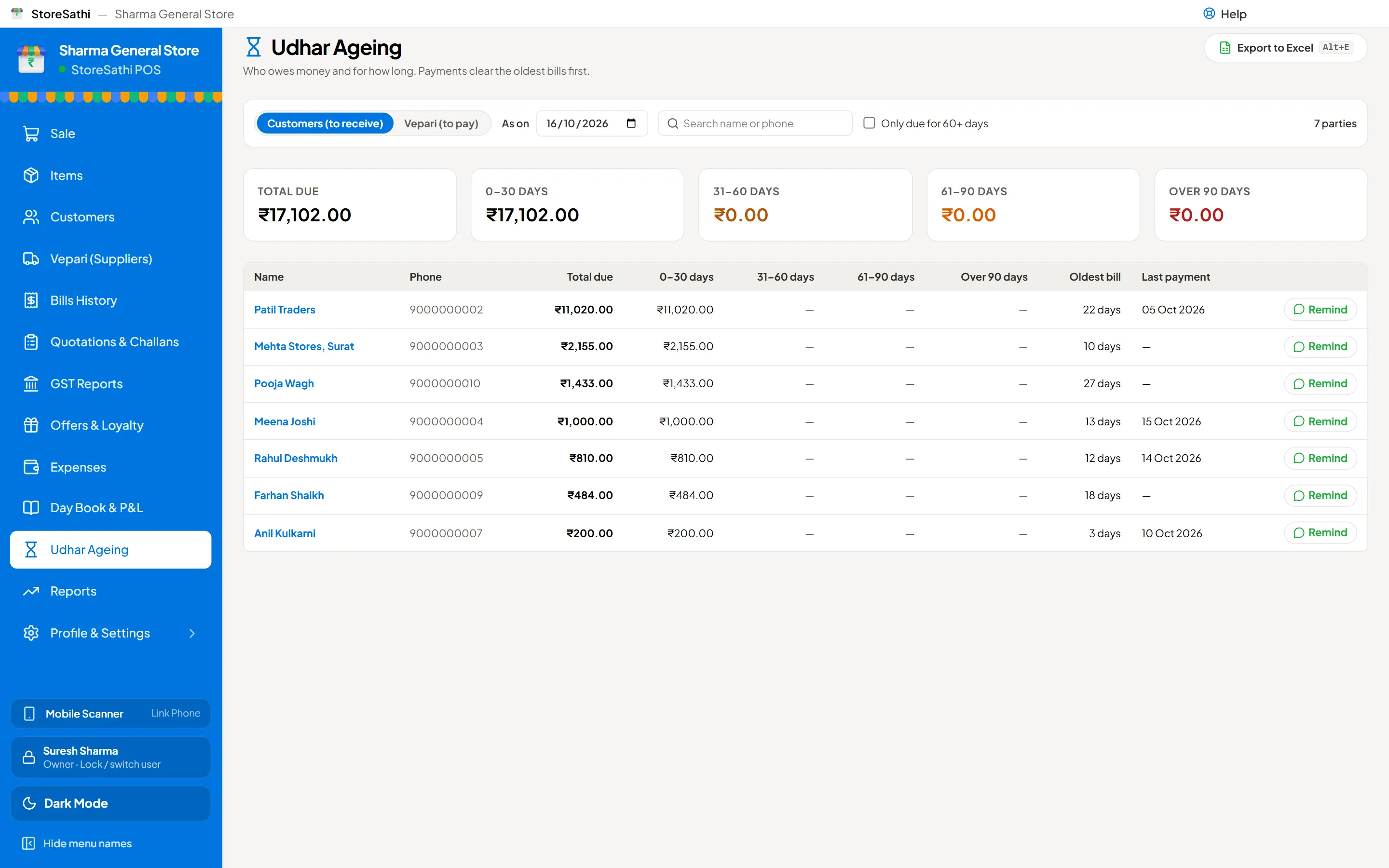
To manage udhar khata without losing money, write every credit at the moment of the sale, keep each customer’s balance in one place, and look at who owes for how long, not just how much. Then remind people early and politely, before small amounts become old ones.
Most udhar is lost through small slips: a bill not written down, a payment not marked, or a customer nobody reminded for three months. This guide covers a simple routine that stops those slips.
Why do shops lose money on udhar?
Udhar is part of how many kirana and general stores keep regular customers. The problem is rarely the customer. It is usually the record:
- The credit is noted later, from memory, and the amount is wrong.
- Two family members take goods on the same account, and nobody adds it up.
- A payment is taken in cash at a busy hour and never marked against the account.
- Nobody checks how old each balance is, so ₹500 from four months ago looks the same as ₹500 from yesterday.
Old udhar is the hardest to collect. The longer it sits, the more likely the customer forgets, argues the amount, or stops coming.
What should every udhar entry have?
Whether you use a notebook or software, each entry needs:
- The customer, by mobile number. Names repeat; mobile numbers do not.
- The date.
- The bill amount and what was bought, so there is no argument later.
- Any payment against it, with the date and how it was paid.
- The running balance.
In StoreSathi, choosing udhar as the payment mode on the sale screen does all of this at once. The bill is saved, the stock goes down and the amount goes into that customer’s khata with a running balance. Nothing is written twice.
How do I see who owes the most, and for how long?
Total udhar tells you how much is out. It does not tell you where the risk is. For that you need an ageing list, which splits each customer’s balance by how old it is.
StoreSathi’s ageing groups every balance into four buckets:
| Bucket | What it usually means |
|---|---|
| 0–30 days | Normal credit, regular customer |
| 31–60 days | Time for a friendly reminder |
| 61–90 days | Needs a call or a visit |
| 90+ days | At risk, act now |
When a customer pays part of their udhar, StoreSathi takes the payment off their oldest bills first. So the ageing list always shows what is truly old, not just the newest bills that happen to be unpaid.
How do I remind customers without spoiling the relationship?
A good reminder is short, exact and polite. It should say the amount, the date, and how they can pay. For example:
Namaste Meena ji, your udhar at Sharma General Store is ₹1,000 as on 16 Oct. You can pay at the shop or by UPI. Thank you.
From the ageing list, StoreSathi opens a WhatsApp reminder for each customer, using a message template you can edit, in several languages. It goes one customer at a time, so you choose who gets reminded and when. If a customer asks for details, send their party statement, which lists every bill and payment for the period, as a PDF or on WhatsApp.
A few habits that help:
- Remind at 30 days, not 90. It feels routine, not rude.
- Keep the same tone for everyone, so nobody feels singled out.
- When they pay, send a receipt. It builds trust for the next udhar.
What about customers who pay in advance?
Some customers leave money with you, or get a refund as store credit. Treat this as the opposite of udhar. In StoreSathi, an advance or store credit sits on the customer’s account and is used on their next bills, so it is never forgotten either.
What if a customer says the amount is wrong?
It happens, and the answer is the record. Open their khata and go through it together: every bill with its date and items, and every payment with how it was paid. Send the party statement for the period on WhatsApp so they can check it at home. Because each udhar was written on the bill itself, there are no memory gaps to argue about, and most differences turn out to be a payment that one side forgot.
How do I move my old udhar notebook into software?
You do not need to copy every old bill. Bring in each customer’s opening balance on the day you start:
- One by one: add the customer and enter their opening udhar or advance.
- From Excel: list customers with their balances and use the bulk import, which checks each row before saving.
- From Tally: move customers with their udhar in one file. See how to move your shop from Tally to StoreSathi.
The opening balance becomes the first line of the khata and counts in the ageing list from day one.
How do I stop staff mistakes on udhar?
If staff bill at your counter, decide who handles udhar and payments. With users and roles turned on, StoreSathi records who made every bill, and you choose what each role may do, such as giving discounts or cancelling bills. A manager’s PIN can approve an action a cashier is not allowed to do alone. More in giving staff billing access safely.
A simple weekly udhar routine
- Daily: choose udhar on the bill, never on paper; mark every payment the same day.
- Weekly: open the ageing list and send reminders to everyone in 31–60 days.
- Monthly: call anyone in 61–90 days; send statements to regular B2B customers.
- Always: back up your data, because your khata is money. See how to keep your shop’s billing data safe.
You can try the khata, ageing and reminders on your own customers during StoreSathi’s free 30-day trial.
In short
- Write udhar at the moment of sale, against the customer’s mobile number.
- Watch the ageing list, not just the total.
- Remind early, politely and with the exact amount.
- Bring old balances in as opening udhar, and keep backups.
Questions
What is the easiest way to keep an udhar khata? Write the udhar at the moment of the sale, on the same bill, against the customer's mobile number. Billing software like StoreSathi does this when you choose udhar as the payment mode.
How do I know which udhar is old? Use an ageing list. StoreSathi groups each customer's balance into 0–30, 31–60, 61–90 and 90+ days, so the oldest money shows first.
How should I remind a customer about udhar? Send a short, polite message with the exact amount and date, and attach a statement if they ask. StoreSathi sends the reminder on WhatsApp from the ageing list, one customer at a time.
What happens when a customer pays part of the udhar? Record the payment against the customer. StoreSathi takes it off their oldest bills first, so the ageing list stays correct.
Can I bring old udhar from my notebook or Tally? Yes. You can enter an opening udhar for each customer, import customers from Excel, or move them from Tally with their balances.