 StoreSathi
 58 mm or 80 mm? Choosing a thermal printer for billing
58 mm or 80 mm thermal printer for your shop? Compare paper width, space on the counter, how much fits on a bill and what to check before you buy.
For most shops, an 80 mm thermal printer is the safer choice if your bills carry GST details, long item names or many lines, because each line has room to breathe. A 58 mm printer is fine for small counters, short bills and tight spaces, and its paper rolls usually cost less. Whichever you choose, make sure your billing software prints to it directly and lays the bill out for that width.
Here is how to decide, what to check before buying, and how StoreSathi prints on both.
What is the difference between 58 mm and 80 mm paper?
The number is the width of the paper roll. The printed area is a little narrower than the roll, because the printer leaves a margin on each side. In practice:
| 58 mm | 80 mm | |
|---|---|---|
| Room per line | Less; long item names wrap | More; names and amounts fit on one line |
| Size of the printer | Smaller, fits a tight counter | Larger |
| Paper rolls | Usually cheaper | Usually a little more |
| Best for | Short bills, tea stalls, small kirana | GST bills, medical, wholesale, longer bills |
The width changes how readable the bill is more than anything else. On a narrow slip, an item like “Groundnut oil 1 L” plus its quantity, rate and amount must squeeze into one line or wrap onto two.
How do I know which width my shop needs?
Ask three questions:
- How long is a normal bill? If most bills have one to five items, 58 mm is enough. If ten or twenty lines are common, 80 mm is easier to read.
- Do you print GST details on the slip? A tax invoice slip carries your GSTIN, the customer’s GSTIN for B2B bills, the HSN of each item and a tax table. That fits more comfortably on 80 mm.
- How much space is on the counter? A 58 mm printer takes less room, which matters at a small counter with a scale, a scanner and a cash drawer.
If you are unsure, 80 mm is the more flexible choice. Most bills that look cramped on 58 mm look normal on 80 mm.
What does StoreSathi print on a thermal slip?
StoreSathi lays the slip out for the width you choose, with a smaller font on 58 mm so lines still fit. A typical slip carries:
- Your shop name, address, phone and GSTIN
- The document title, bill number, date and time, and payment mode
- The customer’s name, phone and GSTIN when there is one
- Each item with its GST rate and HSN, quantity, rate and amount
- The total, any discount or reward, and a GST table by rate
- “Thank You! Visit Again” at the end
You can try this yourself on the home page, where the sample slip switches between 58 mm and 80 mm as you change the bill. The printing features list the rest.
Do I need a special driver or app?
StoreSathi prints to any 58 mm or 80 mm thermal printer that is installed in Windows. You choose the printer once in settings, and from then on bills print silently, with no print box at every sale. That is what keeps billing fast at a busy counter.
Before you buy, check that the printer comes with a Windows driver and connects to your PC, usually by USB. Ask the seller to print a test page from Windows; if that works, StoreSathi can print to it.
What else should I check before buying a thermal printer?
- Auto-cutter. A printer that cuts the paper itself saves time and gives a cleaner slip.
- Print speed. Faster printers matter on busy days, when a queue builds.
- Paper roll size that fits the printer, and easy availability in your area.
- Warranty and service from a local seller, because a printer down means no slips.
Thermal paper fades with heat and time, so keep important records in the software, not only on paper. Your bills stay in StoreSathi even when the slip fades, and you can print a copy again later.
How do I keep the printer running on busy days?
- Keep a spare roll next to the printer, and change it before the end-of-roll mark, not in the middle of a bill.
- Use the right paper. A roll that is too wide or too thick jams; check the width and the roll size the printer takes.
- Clean the print head now and then with the method the maker gives, when slips start to look faint.
- Print a test bill each morning after a power cut, so you find a problem before the first customer does.
Should I print A4 bills too?
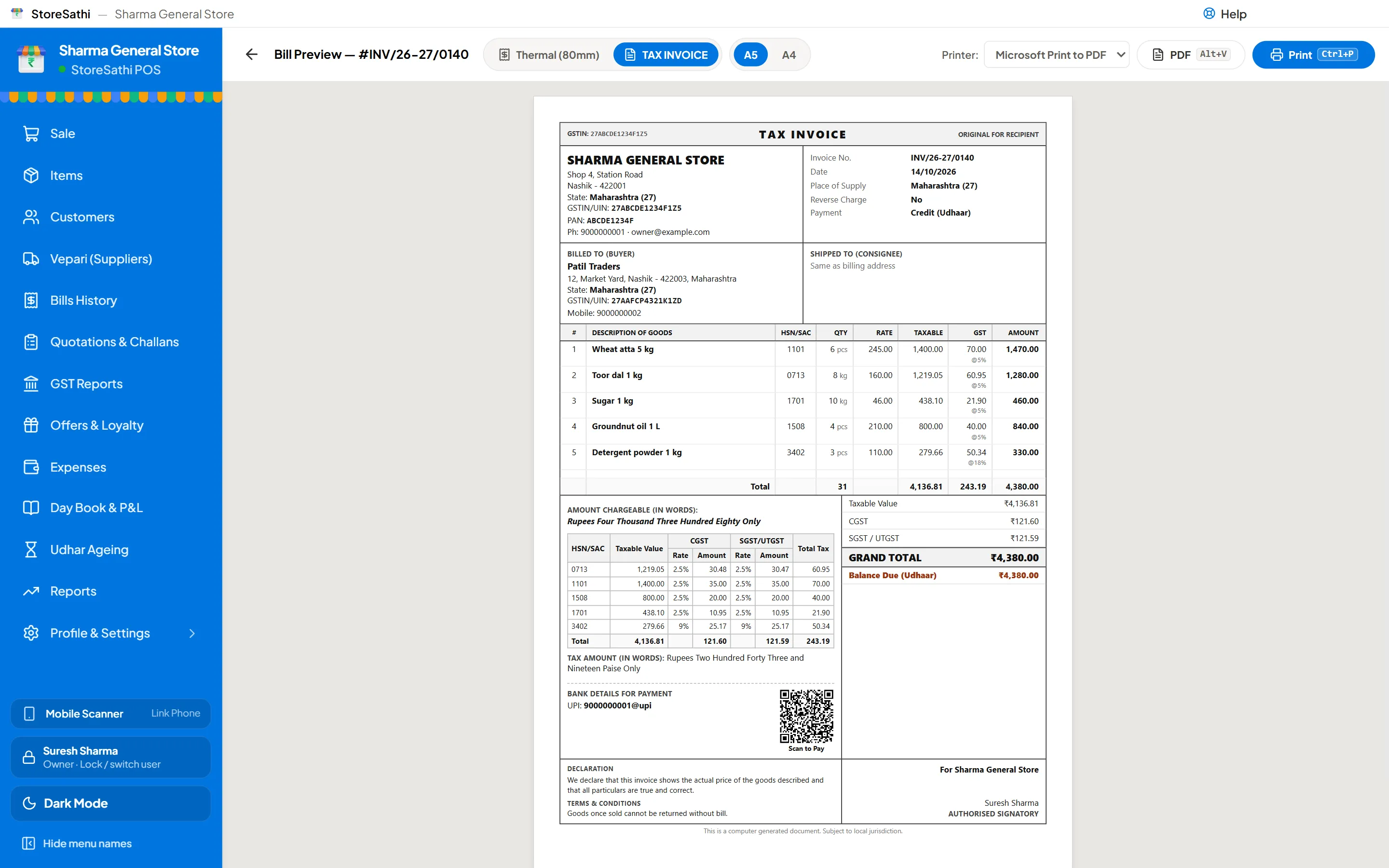
Some customers, especially businesses, want a full A4 invoice. StoreSathi prints A4 and A5 invoices from the same bill, or saves a PDF. You get seven GST invoice designs and four shop-bill designs, with your logo and colour, and your UPI QR and bank details can print on the invoice.
Many shops keep a thermal printer at the counter for walk-in customers and use A4 for B2B bills and statements.
Can I skip printing and send the bill on WhatsApp?
Yes. Many customers prefer the bill on their phone. StoreSathi sends the bill on WhatsApp as a message, or sends the PDF itself when WhatsApp automation is turned on. It saves paper, and the customer always has a copy. Udhar customers also like getting their statement this way; see how to manage udhar khata.
What about barcode labels?
A thermal receipt printer is not the same as a label printer. If you want to stick barcodes on loose or repacked goods, read barcode labels for your shop for sizes and how to print them from StoreSathi.
You can test both paper widths with your own printer during StoreSathi’s free 30-day trial.
In short
- 80 mm for longer bills and GST details; 58 mm for short bills and small counters.
- Check for a Windows driver and a test page before buying.
- StoreSathi prints silently to any installed 58 or 80 mm printer.
- Use A4 or A5 for business customers, and WhatsApp to save paper.
Questions
Which is better for a shop, a 58 mm or an 80 mm thermal printer? 80 mm suits shops with longer bills, GST details and many items, because each line has more room. 58 mm suits small counters and short bills, and the paper rolls are usually cheaper.
Does StoreSathi work with my thermal printer? StoreSathi prints to any 58 mm or 80 mm thermal printer that is installed in Windows. You choose the printer once and bills then print silently, without a print box each time.
Can I print A4 bills as well as thermal slips? Yes. StoreSathi also prints A4 and A5 invoices, or saves a PDF, with seven GST invoice designs and four shop-bill designs.
Can I send the bill on WhatsApp instead of printing? Yes. StoreSathi can send the bill on WhatsApp as a message, or as the PDF itself when WhatsApp automation is turned on.