 StoreSathi
 Quotation, challan, bill, credit note: the papers of one sale
How a shop sale moves from quotation to proforma, delivery challan, bill and credit note, what each paper is for, and how StoreSathi turns one into the next.
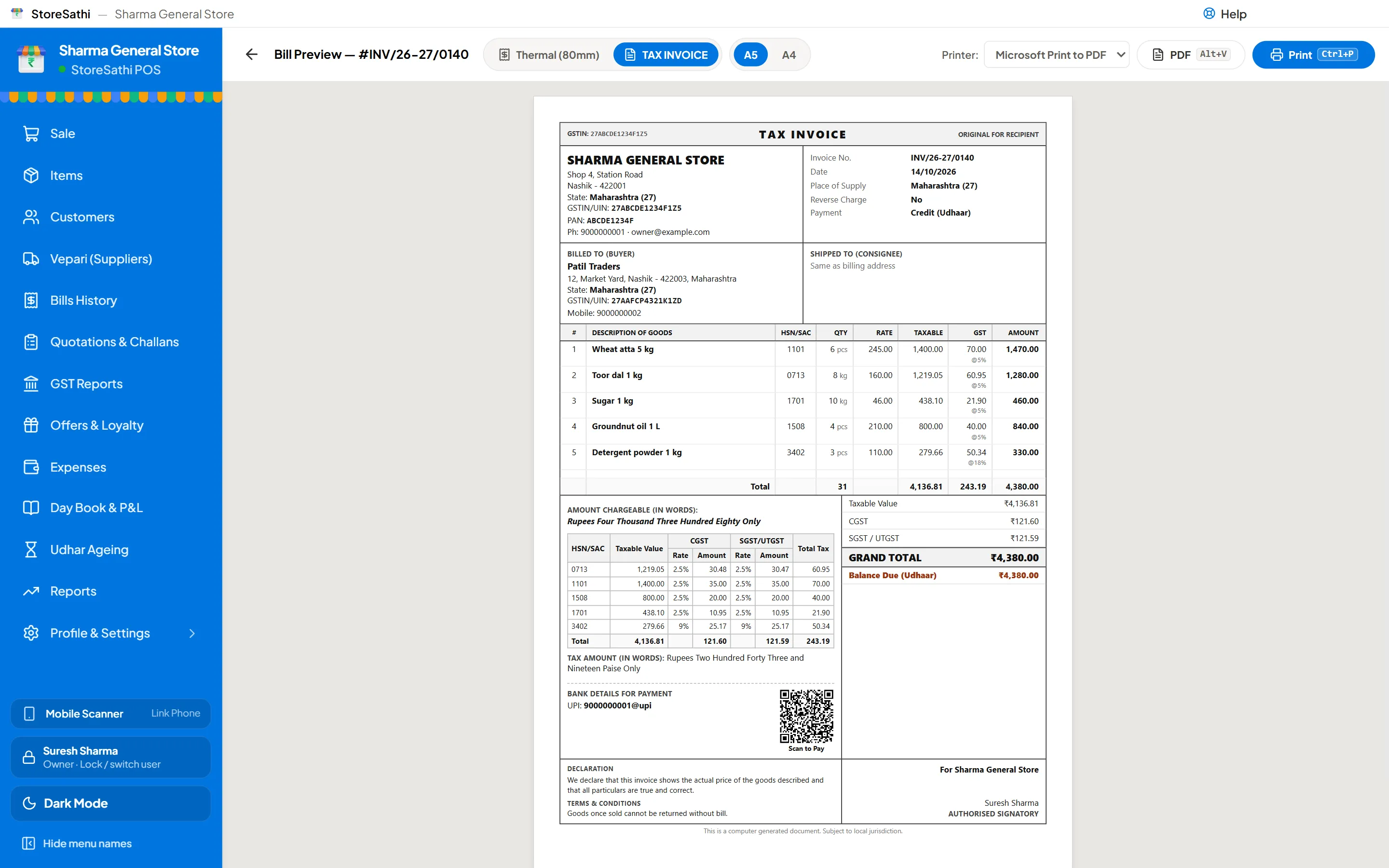
Most sales at a shop need one paper: the bill. Some need more. A business buyer asks for a quotation first; goods may leave on a delivery challan before the bill is made; and when goods come back, the shop gives a credit note against the bill. In StoreSathi each of these turns into the next in one step, so nothing is typed twice and the numbers always agree.
Here is what each paper is for, the order they usually come in, and how to make each one.
What is each paper for?
| Paper | What it says | Changes stock? | Changes accounts? |
|---|---|---|---|
| Quotation | “This is what it will cost, until this date.” | No | No |
| Proforma invoice | A formal offer that looks like a bill, often for an advance | No | No |
| Delivery challan | “These goods went to you; the bill will follow.” | Yes, goods go out | No |
| Bill (tax invoice) | The sale itself | Yes | Yes |
| Credit note | “These goods came back, or the price came down.” | Yes, for returned goods | Yes |
You can see a real example of each one, printed by StoreSathi, on the bill formats page: a quotation, a delivery challan, a GST invoice and a credit note.
Step 1: the quotation
A quotation answers “how much?” before the customer commits. It lists the items, rates, tax and total, and a date it is valid until.
In StoreSathi, open Quotations and press Alt+C for a new one. Pick the customer, add items as you would on a bill, set the valid-until date and save. Alt+P shows and prints it, and Alt+W sends it on WhatsApp, as a PDF when WhatsApp automation is on.
A quotation does not touch stock or accounts. When its date passes, StoreSathi shows it as expired in the list, which is a good moment to check prices again before you go further.
Step 2: the proforma invoice (when you need one)
Some buyers want a paper that looks like a bill before they pay, for example to release an advance. That is a proforma invoice. With the quotation selected, Alt+R turns it into a proforma in one step. The quotation is marked as converted, with the proforma’s number beside it, so you can always trace one to the other.
A proforma is still an offer. Stock and accounts do not change.
Step 3: the delivery challan (when goods go first)
Sometimes the goods leave the shop before the bill is made: a regular buyer takes goods today and is billed at the end of the week, or goods go out on approval. A delivery challan records what went, to whom and on which day.
You can make a challan on its own from the Challans tab in Quotations, or convert a quotation or proforma into one. When you save it, the goods leave stock, so your stock report stays true while the bill is pending. The challan stays open until it is billed.
If some goods come back unsold, record them on the challan with a reason. They return to stock, and the challan shows what is still pending.
Step 4: the bill
This is the sale. There are two ways to reach it without typing again:
- From a quotation or proforma: select it and press Alt+B. The items, rates and customer go into billing.
- From challans: one bill can take in several open challans for the same customer, in full or in part. Each challan is marked billed, or shows what is still pending.
The bill carries everything a GST bill in StoreSathi carries: HSN codes, CGST and SGST or IGST by the buyer’s state, the HSN summary, and your UPI QR. You can print it on A4, A5 or a thermal roll, or send it on WhatsApp. To practise, the free invoice generator uses the same designs.
Step 5: the credit note (when goods come back)
When a customer returns goods from a bill, press Ctrl+F8 for a sales return and find the original bill. Choose what is coming back; it goes back into stock. Then choose how you settle: cash, UPI, store credit or an exchange.
For a GST-registered shop, StoreSathi gives the return the next credit note number and prints it against the original invoice, with the reason. If the price changes without goods coming back, you can make a credit or debit note against the bill instead.
A credit note made by mistake can be cancelled with a reason, and the cancellation stays in the activity log.
Why keep them linked?
Because each paper is made from the one before it:
- Nothing is typed twice, so the bill cannot disagree with the quotation the customer accepted.
- Stock stays true from the day goods leave, not the day the bill is made.
- Every paper points to the next. A quotation shows the proforma or challan it became; a credit note shows the bill it is against. Months later, you can follow a sale from start to end.
- Your CA sees one story. The bills and credit notes flow into the GST reports StoreSathi prepares, which your CA should still check before filing.
What about e-way bills and e-invoices?
When a sale needs an e-way bill or an e-invoice, StoreSathi prepares the JSON file for you to upload on the government portal, and prints the IRN and QR on the bill once you have them. Whether a particular sale needs one depends on the goods, the value and the rules in force, so ask your CA.
Do small shops need all this?
Not for every sale. A kirana counter may go weeks without a quotation. But the day a hotel or an office asks for a quotation, or a regular buyer wants goods on challan, it helps when the software already knows how. See billing for wholesale and distributors for the shops that use these papers every day.
In short
- Quotation and proforma are offers; they change nothing.
- A challan moves goods out of stock before the bill.
- One bill can take in a quotation, or several challans.
- A credit note reverses goods or price against a bill.
- In StoreSathi each paper turns into the next with one key, and you can try it free for 30 days.
Questions
Do I need all four papers for every sale? No. A walk-in customer usually gets only a bill. Quotations, challans and credit notes are for the sales that need them: a business buyer who wants a price first, goods that go out before the bill, or goods that come back.
Can StoreSathi turn a quotation into a bill without typing it again? Yes. In Quotations, select the row and press Alt+B. The items, rates and customer go into billing, and you finish the bill as usual.
Does a delivery challan reduce stock in StoreSathi? Yes. The goods leave stock when you save the challan, and the challan stays open until it is billed. Goods that come back are recorded on the challan with a reason.
Can one bill cover several challans? Yes. When you bill, you can take in several open challans for the same customer, in full or in part, and each challan shows what is still pending.
When is a challan or a credit note required by law? That depends on the goods, the buyer and the situation, and the rules change. Ask your CA. StoreSathi makes the documents; it does not decide which ones your sale needs.