 StoreSathi
 Price with GST or without? Setting item prices right
Should an item's price include GST or have it added? How the two ways work out, where each one fits in a shop, and how StoreSathi handles both on every bill.
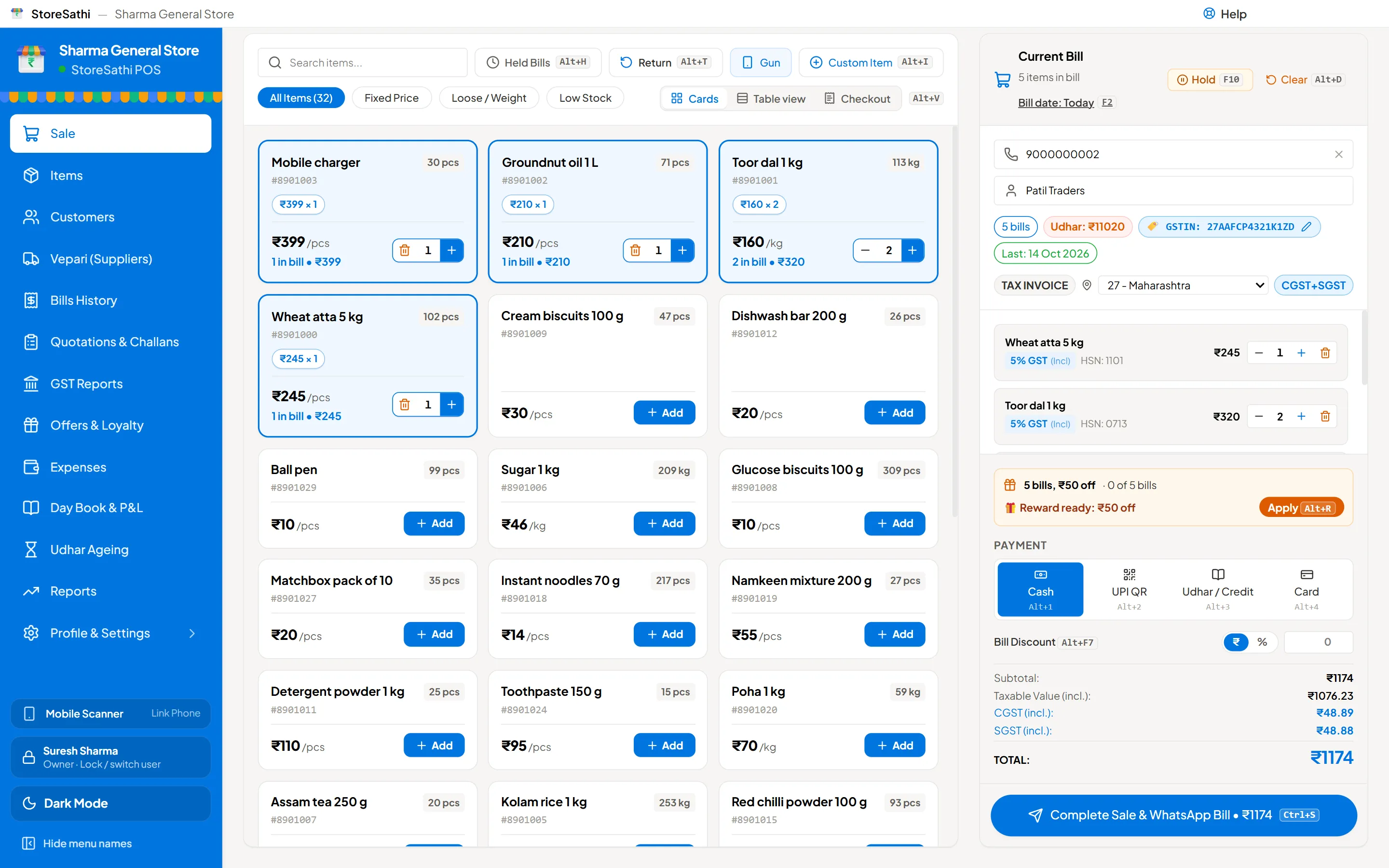
Every item you sell has a price, and every price either includes GST or has GST added on top. Both are correct; they just fix a different number. With GST inside, the customer pays exactly the price on the shelf and the tax is worked out from it. With GST added, the price before tax is fixed and the bill adds the tax. In StoreSathi you choose this for each item, once, and every bill works it out the same way.
Here is how the two ways work, where each fits, and how to set them up.
How does “price includes GST” work?
The price is the final amount. The software works backwards to find the part that is tax:
- Price before GST = price ÷ (1 + rate ÷ 100)
- GST = price − price before GST
For example, an item priced at ₹118 with 18% GST inside: ₹118 ÷ 1.18 = ₹100 before GST, and ₹18 is GST. The customer pays ₹118.
This is how most shelf prices work for walk-in customers: the price on the label, the rate card or the packet is what they pay.
How does “price plus GST” work?
The price is before tax, and the bill adds GST:
- GST = price × rate ÷ 100
- Total = price + GST
An item priced at ₹100 plus 18% GST: ₹18 GST, total ₹118.
This is common in wholesale and with business buyers, who compare rates before tax because they may claim the tax back.
You can try both on the free GST calculator: type an amount, pick a rate, and switch between “before GST” and “with GST”.
Which one should my shop use?
| Situation | Usually simpler |
|---|---|
| Walk-in customers, shelf or label prices | Price includes GST |
| Packed goods with a printed price | Price includes GST |
| Business buyers who compare rates before tax | Price plus GST |
| Wholesale price lists | Price plus GST |
| A shop that does both | Set each item the way it is usually sold |
There is no need to choose one way for the whole shop. A general store might sell most items with GST inside, and a few bulk items to business buyers with GST added.
Whatever you choose, the GST rate of each item is a separate question. It depends on the item and its HSN code, and rates change from time to time, so check them with your CA. This guide is only about which number is fixed.
How do I set it in StoreSathi?
When you add or edit an item, you set:
- The GST rate, and the HSN code.
- Whether the price includes GST. New items start with the price including GST, because that is how most shop prices work; change it for items you sell before tax.
From then on, each bill line uses that setting. On a B2B bill, StoreSathi splits the tax into CGST and SGST for a buyer in your state, or shows IGST for a buyer in another state.
Can I change it on one bill?
Yes. At the counter, each line shows a small GST tag, such as “18% GST (Incl)”. Click it to change the rate or switch between included and added for that line only. The item’s own setting stays as it was for the next bill.
This helps when a regular customer has agreed a rate before tax, or when a custom item needs a rate it does not usually carry.
What about discounts?
A discount comes off the price first, and GST is worked out on what is left. With GST inside, a ₹10 discount on a ₹118 item makes the price ₹108, and the tax is worked out from ₹108. With GST added, a ₹10 discount on a ₹100 item leaves ₹90 before tax, and GST goes on ₹90.
StoreSathi does this on every line, and also spreads a bill discount across the lines so the tax on each line stays right.
What about the price I pay the vepari?
Purchase bills from your vepari usually show rates before GST, with the tax added at the bottom. That does not stop you selling with GST inside. What matters for your margin is the cost before GST against the selling price before GST, because the tax is not your income.
StoreSathi keeps this straight for you: its profit and loss report leaves GST out of both sales and purchases, so the margin you see is the real one. When you set a selling price with GST inside, take the price before GST (price ÷ 1.18 at 18%, for example) and compare it with your cost before GST.
Why do two calculators sometimes disagree by a paisa?
Because they round at different steps. StoreSathi rounds to the paisa on each line: the price before tax, then the tax, then CGST as half of the tax and SGST as the rest, so the two halves always add up. The GST calculator on this site uses the same code, so its answers match StoreSathi bills exactly.
What does the customer see?
On a shop bill, the customer sees the item, quantity, rate and amount, and a GST summary by rate at the bottom. On a full GST invoice, each line shows the taxable value and the tax, with an HSN summary. See a sample GST invoice to compare.
If you print on a thermal roll, read 58 mm or 80 mm? for how much fits on a slip.
A quick check before you start
- Pick a few items you sell every day and bill them on a test bill.
- Check the total the customer pays is what you expect.
- Check the tax split against the calculator.
- Ask your CA to look at one full GST invoice before you use it with business buyers.
In short
- With GST inside, the total is fixed; with GST added, the price before tax is fixed.
- Walk-in prices usually include GST; wholesale prices usually do not.
- StoreSathi lets you set it per item and change it per line.
- Rates are a separate question for your CA. You can try all of this free for 30 days.
Questions
Which is better for a shop, price with GST or price plus GST? For goods sold to walk-in customers at a printed or fixed price, a price that includes GST is usually simpler: the customer pays the number on the shelf. Price plus GST suits business buyers and wholesale, where rates are quoted before tax.
Will the GST be different depending on which way I set the price? The tax rate is the same. What changes is which number is fixed: with GST inside, the total is fixed and the tax is worked out from it; with GST added, the price before tax is fixed and the tax goes on top.
Can I change it for one line on a bill? Yes. In StoreSathi each item has its own setting, and at the counter you can change the GST rate and whether it is included for one line, from the GST tag on that line.
Why is the tax sometimes a paisa different from my calculator? StoreSathi rounds to the paisa on each line: first the price before tax, then the tax, then CGST as half of it and SGST as the rest. Rounding at a different step can give a paisa of difference.