 StoreSathi
 Let staff bill without seeing your profit
How to give shop staff billing access with roles and PINs: who can cancel bills, give discounts or see cost and profit, with manager approval and an activity log.
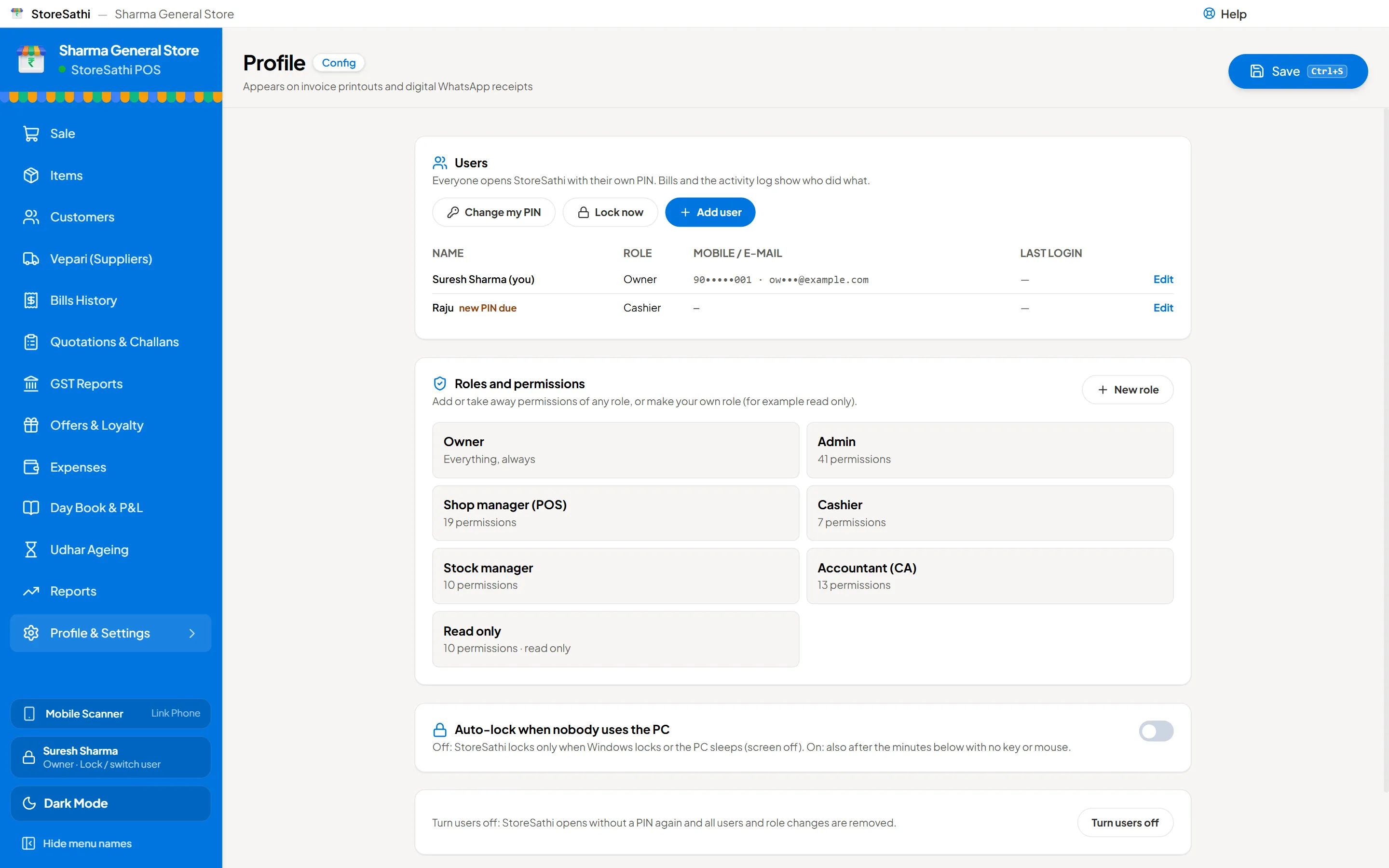
To let staff bill without seeing your profit, turn on users in StoreSathi, give each person a role and their own PIN, and keep cost and profit for the Owner. A Cashier can then make bills, take payments and print, while cost and profit stay hidden in the item form, profit and loss, stock summary and analytics. Anything a role cannot do needs a manager’s PIN, once.
Most shops start with the owner doing everything. Then a son or daughter joins, then a helper, then a second helper for the busy season. Sharing one login with everyone is easy, but it means anyone can cancel a bill, change a price or see what you earn on each item. Roles fix that without slowing the counter.
How do I turn on users and roles?
Users are off when you first install StoreSathi, so a one-person shop never sees a login screen. When you are ready:
- Open Settings › Users & roles and turn users on. You become the Owner.
- Add each person with their name and a role.
- Give each person a starting PIN of 4 to 6 digits. At their first login, StoreSathi asks them to change it, so only they know it.
From then on, StoreSathi asks for a PIN when the app opens. Anyone can switch user from the sidebar, for example when the owner takes over the counter from a helper at lunch.
Which roles are there?
There are seven ready roles. You can use them as they are, change them, or make your own.
| Role | Typical use |
|---|---|
| Owner | You. Everything, including users and settings. |
| Admin | A partner or family member who runs the shop with you. |
| Shop manager | Runs the counter and the day, can approve what a cashier cannot do. |
| Cashier | Makes bills and takes payments. |
| Stock manager | Purchases, goods received and stock. |
| Accountant | Accounts, GST reports and exports for the CA. |
| Read only | Can look, cannot change anything. |
What can a role be allowed or stopped from doing?
The work that causes the most trouble in a shop is under control:
- Bills: cancel, edit, back-date, give a discount.
- Records: delete a customer, vepari or payment; change an item’s price, cost or stock; cancel any voucher.
- Locks: lock a filed GST month, close or reopen the year.
- Shop-wide work: settings, wiping data, imports such as Tally files, backup and restore, Excel exports.
- What they can see: cost price and profit.
Discount is allowed or not allowed per role. There is no percentage limit per role yet, so a role that may give discounts can give any discount. If that worries you, keep discounts off for cashiers and approve them with a manager’s PIN.
Where exactly are cost and profit hidden?
For a role without permission, cost and profit are hidden in the item form, profit and loss, the stock summary and analytics. These are the places where margins are easy to read at a glance.
Be aware that cost is still visible in the purchase screens, in the vepari’s stock tab and in item exports. So give purchase work and exports only to people you trust with your costs, such as an Admin or a Stock manager.
What if a cashier needs something they are not allowed to do?
This happens every day. A customer returns an item, or a bill was made with the wrong quantity and has to be cancelled.
Instead of logging out and in, StoreSathi shows an approval popup. The manager or owner types their PIN, and that one action is allowed. The cashier stays logged in and their role does not change. The approval is noted, so later you know who allowed what.
How do I know who did what?
Every bill shows who made it. The activity log records changes, so if a price was changed or a bill cancelled, you can see by whom and when.
This is good for the staff as well. When a cash difference turns up at closing, the log shows facts instead of guesses, and an honest cashier is protected.
How safe are the PINs?
- PINs are stored hashed, never as plain text.
- After wrong PINs, StoreSathi locks out for a while, and longer after each new attempt, so guessing does not work.
- The app locks itself when the PC is left idle, and when Windows locks.
Users and roles live on the PC where they were made. Several PCs sharing one shop’s users is not built yet. Linked phones are covered, though: a phone works under the role of the person logged in on it. See using your phone as a second billing counter.
A simple setup for most shops
- Owner: you, with your own PIN that nobody else knows.
- Shop manager: your most trusted person at the counter, who approves returns and cancellations.
- Cashier: each helper, with their own PIN. No discounts unless approved.
- Accountant: your CA’s assistant, if they come to the shop to take reports.
Roles work best together with good habits: count the cash at closing in the day book, keep the khata up to date (see how to manage udhar khata), and make sure backups run (see keeping your shop’s data safe).
What do I do when a helper leaves?
Do not delete their bills or change their old records. Open Settings › Users & roles and mark that user as not active, so their PIN stops working while their name stays on every bill they made. If they used a linked phone, remove that phone from the Phones screen on the PC as well.
If someone may have seen another person’s PIN, ask that person to change it the same day.
In short
- Users are off at first; turn them on in Settings › Users & roles when you add staff.
- Seven ready roles, or your own; each person has their own PIN.
- Cost and profit are hidden in the item form, P&L, stock summary and analytics for roles without permission.
- A manager’s PIN allows one refused action, without changing the cashier’s role.
- Every bill shows who made it, and changes are logged.
Users and roles are part of every StoreSathi plan; see the team features or try it free for 30 days.
Questions
Can a cashier make bills without seeing my profit? Yes. Give them the Cashier role. They can bill, while cost and profit stay hidden in the item form, profit and loss, stock summary and analytics.
What if a cashier needs to cancel a bill? A manager or the owner types their PIN on the approval popup, and that one action is allowed. The cashier's role stays as it is.
Can I make my own role? Yes. Start from one of the seven ready roles and change what it can do, or make a new role from scratch.
Is a PIN safe enough? The PIN is stored hashed, not as plain text, and wrong PINs lead to a lockout that grows longer. The PC also locks when it is left idle or when Windows locks.
Do users work on the phone too? Yes. A linked phone works under the role of the person logged in on it, with the same limits as on the PC.